FollowSet is live on the App Store. Get 20% off Pro Yearly with code OFF20.

Lifting log from saved videos · iPhone

Lift whatyou save.

Share a workout video from Instagram or TikTok, and FollowSet turns it into a workout you can follow in the gym: every exercise, set and rep, with a rest timer and a log of every lift.

  • No account needed
  • No ads
  • Free to start
Works with videos from
  • Instagram
  • TikTok
  • YouTube
  • Facebook
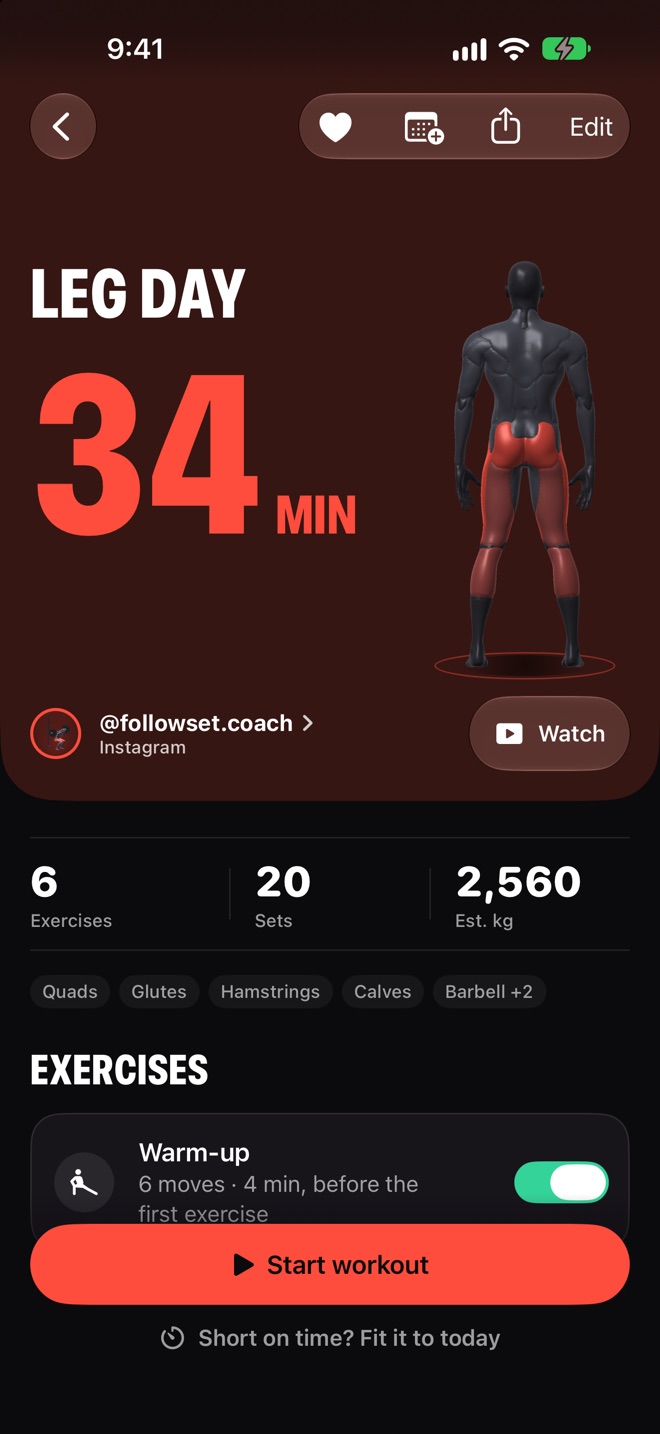
A saved leg-day video turned into a FollowSet workout: Leg Day, 34 minutes, 6 exercises, 20 sets, credited to the creator, with a Start workout button.

How it works

From your saves
to the gym floor

  1. Share the video

    Tap Share on a workout video and pick FollowSet. It reads the exercises, sets and reps for you.

  2. Check it in one tap

    Anything it isn't sure about is highlighted, so nothing wrong slips in quietly. The creator stays credited.

  3. Train it set by set

    Follow along with a rest timer on your Lock Screen, log every lift, and see what you did last time.

Video links (3 free, then Pro) Screenshots Screen recordings A photo of a gym whiteboard Pasted text Hevy & Strong history

Train with it

Follow along,
log every set

  • A rest timer on your Lock Screen and in the Dynamic Island.
  • Log weight and reps; FollowSet shows last time and suggests what to try next.
  • Warm-up sets, stretches, a plate calculator and RPE.
  • Supersets, circuits, EMOM, AMRAP and Tabata.
The workout player during a set, with weight and reps to log and the rest timer.

Honest imports

Flags anything
to double-check

  • Numbers only when the video actually says them, never guessed.
  • Unsure exercises and sets are marked, so you fix them in one tap.
  • Every workout links back to the creator who made it.
An imported workout with one exercise highlighted to check.

Exercises
in 3D

  • See how each move is done, from any angle.
  • The muscles it works, highlighted on the body.
  • Or have the how-to read aloud between sets.
A 3D exercise demo with the worked muscles highlighted.

See your progress

Week by
week

  • Personal records, celebrated the moment you set them.
  • The muscles you trained this week, on a 3D body.
  • Charts for every exercise, a calendar, badges and your streak.
  • Body weight from Apple Health next to your training.
The progress screen with weekly training and personal records.

Plan your week

Turn saves into
a program

  • Put saved workouts on the days you train, with reminders.
  • Repeat 2 to 4 of them for 4 to 8 weeks, with a target for every set.
  • Miss a day and the next one waits for you.
  • Widgets, weekly goals and “Start today's workout” with Siri.
A program built from saved workouts, at week 2.
252exercises in 3D
15languages
0accounts needed
0ads

Yours, privately

No account.
No ads.

Your workouts stay on your iPhone and in your private iCloud. Read the privacy policy.

On your iPhone

Screenshots and recordings are read on the phone. Recordings are deleted after reading.

Works with Apple Health

Finished workouts can go to Health, and body weight comes from it, if you turn it on.

Leave any time

Export your history whenever you like, or delete everything in one tap.

Pricing

Free to start.
Pro when you're hooked.

Free

$0

forever

  • Follow and log workouts
  • Your first 3 video links are free
  • Import screenshots, recordings and text, a few a month
  • Progress, records and badges
  • 252 exercise demos

Pro Monthly

$4.99

per month

  • Import straight from a video link after your first 3 free ones
  • Unlimited imports, no monthly cap
  • Save as many workouts as you like
  • Unlimited folders
  • Programs from your saves
Best value

Pro Yearly

$34.99

per year · 1-week free trial

  • Everything in Pro Monthly
  • About $2.92 a month
  • Try it free for a week

US prices; your App Store shows the price in your currency. Payment is charged to your Apple Account. Subscriptions renew automatically unless cancelled at least 24 hours before the end of the period; manage or cancel them in your App Store settings. A program you started keeps running if Pro ends. See the Terms of Use.

Questions

Good to know

Which videos work?

Workout videos you can share from Instagram (Reels, posts and photo carousels), TikTok, YouTube (regular videos and Shorts) and Facebook. FollowSet reads a YouTube video itself up to about 3 minutes. For a longer video it can still read a workout written in the description; otherwise add screenshots of the workout. Your first 3 video links are free, then link import is part of Pro. On the free plan you can also import screenshots, a screen recording, a photo of a whiteboard, or paste the text, within a monthly limit.

Do I need an account?

No. FollowSet works without one, and your workouts sync through your own iCloud. You can sign in with Apple or email if you want your settings and Pro to follow you to a new phone.

What happens to the videos I share?

Only the public post is read, nothing about you goes with it, and the video is deleted after reading. FollowSet keeps the workout and credits the creator. Screen recordings stay on your iPhone unless you allow them to be sent for naming exercises.

Can I bring my history from another app?

Yes. Import your history from Hevy or Strong, and export yours any time.

Which iPhones does it run on?

FollowSet needs iOS 26 or later. It also runs on iPhone Duo, on its outer display and its open inner display. It works with Apple Health, Siri, Home Screen and Lock Screen widgets, and shows heart-rate zones when you train with a heart-rate monitor or AirPods Pro 3.

Is FollowSet made by Instagram or TikTok?

No. FollowSet isn't affiliated with Instagram, TikTok, YouTube or Meta. It keeps the creator credited and links back to the original post.
Stop saving.
Start lifting.

Your saved workouts are waiting. Turn the next one into a session today.